Margaret brought in her laptop on a Wednesday morning, a little embarrassed. It had simply stopped turning on. No warning, no drama — she'd closed the lid the night before and by morning it was, as she put it, "completely dead." She'd had it for about four years and figured it had just given up the ghost. She was already bracing herself for the cost of a new one.
But then, almost as an afterthought as she was leaving, she mentioned something. "Oh — I did spill a bit of coffee on it a few months back. But it was fine afterwards, so I didn't think anything of it."
That one sentence changed everything.
What the Customer Thought Was Wrong
Margaret's assumption — entirely reasonable — was that the laptop had simply reached the end of its life. Four years old, used every day for her small bookkeeping business, she thought it had just worn out. The coffee spill from three months earlier had never crossed her mind as a suspect. After all, the machine had worked perfectly ever since. She'd blotted it dry, waited a bit, and carried on. No issues. Case closed.
That logic makes complete sense. If something was going to go wrong because of a spill, surely it would have gone wrong straight away?
Not necessarily. And this is the thing that surprises almost everyone.
What Was Actually Going On Inside
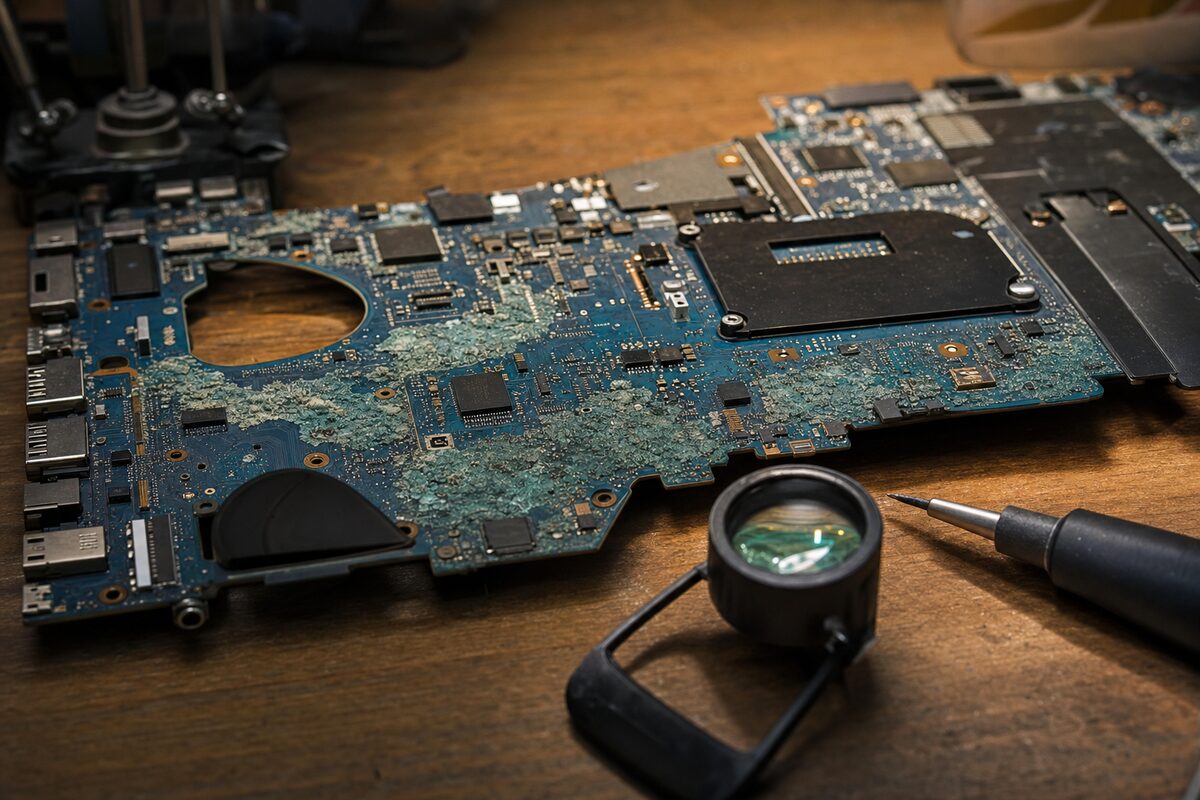
When we opened up the laptop, the culprit was immediately obvious — even if the timeline wasn't. Running diagonally across the motherboard was a faint but unmistakable trail of green-grey corrosion, centred around a cluster of small components near the charging circuitry.
This is what liquid damage actually looks like in slow motion. Coffee (and tea, and juice, and basically anything that isn't pure distilled water) leaves behind residue — sugars, minerals, acids — when it dries. That residue is mildly conductive and mildly corrosive. At first, it might not cause any obvious problem. The laptop works. You breathe a sigh of relief.
But over weeks and months, that residue quietly attacks the tiny solder joints and copper traces on the board. It's an electrochemical process — every time the laptop is powered on, a tiny current flows through that residue, accelerating the corrosion. Gradually, connections that were fine become unreliable. Then they fail entirely. From the outside it looks like the laptop just died of old age. From the inside, it looks like a slow, preventable disaster.
In Margaret's case, the corrosion had eaten through a section of the power management circuitry. The battery was actually fine. The charger was fine. The connection between the two — managed by a set of components on the board — had been destroyed.
How We Diagnosed It
The process was fairly straightforward once the lid was off. Visual inspection under a bright light and a loupe lens showed the corrosion clearly. We cleaned the affected area with isopropyl alcohol and a soft brush to remove the residue, then used a multimeter to test continuity across the damaged traces.
Sure enough: no continuity where there should have been. Two small components in the charging path had failed completely. With the board cleaned and those components replaced — a job that requires a steady hand and a fine-tipped soldering iron — the laptop powered up first time.
Margaret's data was untouched. Her files, her bookkeeping software, her email — all exactly as she'd left it. She did not need a new laptop. Total cost: well under a hundred pounds, and a fraction of a replacement.
The Practical Lessons Here
This story has a few takeaways that are genuinely worth remembering:
- Liquid damage doesn't always show up immediately. If your laptop survives a spill, don't assume you're in the clear. The damage can be brewing silently for weeks or months.
- Always tell your repairer about any spills, even old ones. It changes the diagnosis completely and saves time — and therefore money.
- If you spill something, act quickly. Power off immediately — don't just close the lid. Remove the battery if you can. Turn it upside down on a towel. Do NOT put it in rice (this is a myth that can actually make things worse by getting rice debris inside). Bring it in as soon as possible, even if it seems fine.
- A laptop that "survived" a spill may still benefit from a professional clean. Getting the residue off the board before it corrodes is far cheaper than repairing the corrosion afterwards.
- Don't assume a dead laptop means a dead laptop. Plenty of machines that seem completely gone are repairable, often at surprisingly modest cost.
The Bigger Picture
There's a tendency, when a computer goes wrong, to assume the worst. A blank screen or a machine that won't turn on feels terminal. And sometimes — honestly — it is. But more often than not, there's a specific, fixable reason, and finding it is mostly a matter of knowing where to look and having the right tools to look with.
Margaret walked in expecting to be told to buy a new computer. She walked out with her old one in her bag, working perfectly, all her files intact. She was, in her own words, "absolutely gobsmacked."
That reaction never gets old.
The real lesson here isn't just about coffee spills. It's about not writing off a machine — or your data — before someone has actually had a proper look. More often than you'd think, what looks like the end is really just a problem waiting to be diagnosed.