Helen runs a small bookkeeping practice from her kitchen table in a village outside Tenterden. She works alone, keeps her own hours, and — until a few months ago — had never had a moment's trouble with her laptop. Then the crashes started.
Not random crashes. Not crashes when she was running spreadsheets, or processing invoices, or doing anything particularly demanding. The laptop crashed specifically and reliably during video calls. Five minutes in, ten minutes in, occasionally twenty — but always during a call. Never any other time.
She'd already tried quite a lot before she brought it in. She'd reinstalled Zoom. Then switched to Teams. Then tried Google Meet. She'd updated Windows, updated her drivers, and — after a particularly frustrating week — had a local IT person do a full reinstall of Windows. The reinstall cost her an afternoon's work and about £60. The crashes continued.
When she described it to us, she was convinced it was a software problem. "It has to be," she said. "It's always the same thing that sets it off."
She was wrong — but it was a completely understandable conclusion.
What the symptoms were actually telling us
When a laptop crashes only under one specific type of task, that's actually a useful clue. It tells you the problem isn't constant — it's triggered by load. Video calls are more demanding than most people realise. Your processor is encoding and decoding video in real time, your webcam is active, your Wi-Fi is working harder, and your RAM is being leaned on. All at once.
If a laptop has a component that's borderline — struggling but not quite failing at rest — video calls are exactly the kind of task that pushes it over the edge.
The first thing we did was run the laptop through some basic stress tests. We didn't start with video call software at all. We used a simple CPU stress tool that pushes the processor to 100% load and watches what happens. Within about four minutes, the temperatures climbed to 97°C — and the laptop shut itself off. Same crash, different cause.
That told us almost everything we needed to know.
What we found when we opened it up
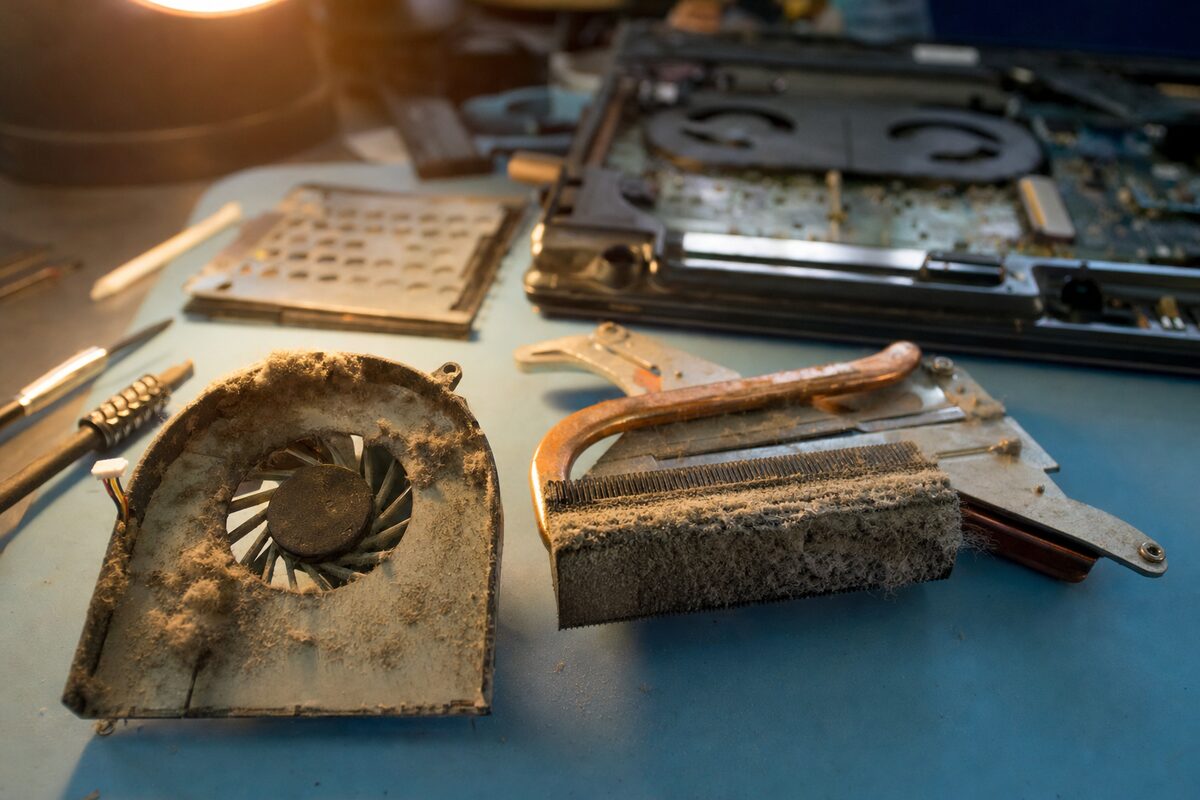
Helen's laptop was a mid-range machine, about four years old. Solid build, nothing fancy. When we took the base panel off, the problem was immediately visible — or rather, immediately felt. The cooling fan was spinning, but barely. It was turning slowly and unevenly, with a faint grinding sound that you'd only notice in a quiet room.
The heatsink — the metal component that draws heat away from the processor — was clogged. Not lightly dusty. Properly blocked. A thick, dense mat of grey fluff had packed itself into the cooling fins so completely that almost no air could pass through. The fan was doing its best to push air through a wall.
This is very common in laptops that live on soft surfaces — sofas, beds, laps — where they hoover up fibres and fluff through their intake vents. Helen admitted her laptop spent most of its time on a padded laptop stand, which was itself sitting on a sofa cushion. Perfect conditions for a gradual, invisible blockage.
At idle — browsing, typing, doing normal office work — the processor barely heats up, so the blocked cooling never mattered. The moment a video call started and the CPU hit sustained load, there was nowhere for the heat to go. The laptop's thermal protection did exactly what it's designed to do: it cut power to prevent permanent damage. From the outside, it looked like a crash. From the inside, it was the laptop saving itself.
What the fix involved
The repair itself was straightforward, though fiddly. We:
- Removed and thoroughly cleaned the heatsink and fan assembly
- Replaced the fan, which was worn and no longer spinning freely
- Stripped the old thermal paste from the processor and GPU and applied a fresh layer — thermal paste dries out over time and loses its ability to conduct heat efficiently
- Cleaned the entire interior while we had it open
- Reassembled and re-ran the stress tests
After the repair, sustained CPU load sat at 71°C. That's perfectly normal. We ran a forty-minute video call simulation without a single hiccup.
Helen had a working laptop back within two days. The total cost was a fraction of what a replacement machine would have been — and considerably less than a third Windows reinstall would have achieved.
Why software gets blamed for hardware problems
This case is a good example of a pattern we see regularly. When a problem is consistent and repeatable, it feels like it must be something logical — a driver conflict, a software bug, a corrupted file. And sometimes it is. But a problem that's triggered by specific tasks — particularly demanding ones — should always raise the question: is there something physical that can't keep up?
Video calls, gaming, video editing, large Excel files with lots of calculations — these are all high-load tasks. If your laptop is fine most of the time but falls apart under those conditions, heat is worth investigating before you spend money on software fixes.
The signs to watch for:
- The base or keyboard getting unusually hot during normal use
- The fan running loudly all the time, or sounding rough or grinding
- Crashes or shutdowns that only happen under heavy tasks
- The system running noticeably slower than it used to, even on simple jobs
- A laptop that's more than two or three years old and has never been cleaned internally
The practical takeaway
Laptops need their cooling systems looked after. It isn't glamorous advice, but it's real. Dust and fluff accumulate silently over months and years, and by the time you notice a problem, the blockage has often been building for a long time.
If your laptop is getting on for three or four years old, has never had its internals cleaned, and you've started noticing it running warm or the fan being noisier than it used to be — a cleaning and thermal paste refresh is cheap, quick, and often dramatically improves both performance and reliability.
Helen, for her part, now uses a proper vented laptop stand that keeps the machine lifted off soft surfaces. It's a £15 bit of kit. Combined with a cleaned-out cooling system, her four-year-old laptop runs cooler today than it probably did when it was new.
Sometimes the right fix isn't a new machine. Sometimes it's a can of compressed air and someone who knows where to point it.