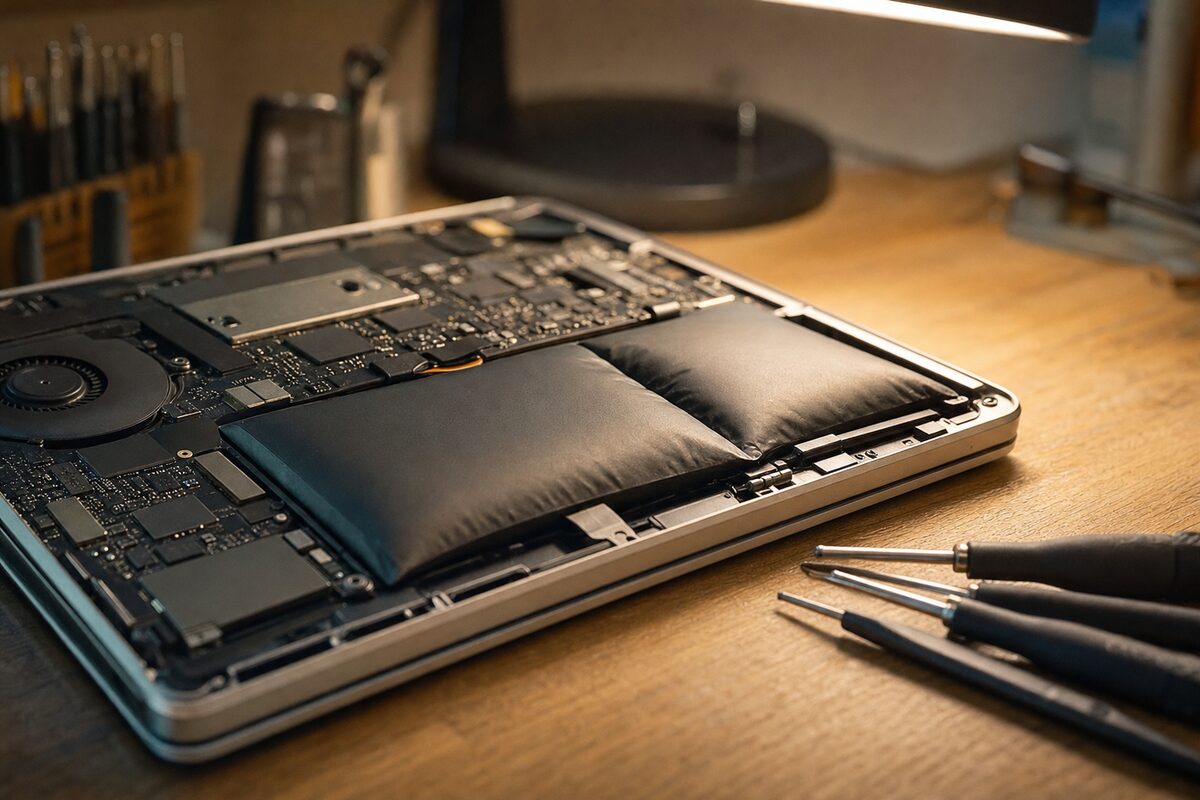
A retired teacher — we'll call him Derek — brought in his four-year-old HP laptop a few months ago with a look on his face that said he'd already made peace with buying a new one. "It's Windows," he told us, with the quiet certainty of someone who'd been told that many times before. "It's corrupted itself again. It's been doing it for weeks."
He wasn't wrong that something was very badly wrong. The laptop blue-screened randomly. It stuttered when opening files. Twice it had simply refused to start, sitting at a black screen for ten minutes before grudgingly coming to life. He'd already run Windows Update, done a virus scan, and asked his son-in-law, who "knows about computers," to have a look. The son-in-law had reinstalled Windows. It had helped for about four days.
What nobody had done was pick the laptop up and look at the bottom of it.
The First Thing We Noticed
When Derek set it on the bench, it rocked slightly — the way a laptop does when one of its rubber feet has fallen off. Except all four feet were present. We flipped it over, and there it was: a faint but unmistakable bow in the bottom panel, right where the battery sits. The plastic had lifted perhaps two or three millimetres at the centre. Barely noticeable unless you were looking for it. We opened the lid and pressed gently on the keyboard around the trackpad area. It flexed more than it should have.
Derek's laptop had a swollen battery — sometimes called a "puffed" or "bloated" battery — and it had been slowly expanding for what was probably several months.
What a Swollen Battery Actually Does to a Laptop
Lithium batteries can swell when they age, overheat, or go through too many charge cycles. The cells inside produce a small amount of gas as they degrade, and with nowhere to go, that gas inflates the battery pack like a very slow, very dangerous balloon.
Most people imagine this is simply a battery problem — the laptop won't hold charge, so you replace it. But the physical expansion causes a cascade of other issues that look completely unrelated:
- The swelling pushes upward against the motherboard, flex cables, and the underside of the keyboard, causing intermittent connection faults
- Pressure on the motherboard can cause micro-flexing — enough to produce random crashes and blue screens that mimic software corruption
- The trackpad, which often sits directly above the battery, gets pushed out of alignment and may stop clicking properly or register phantom touches
- In some cases, the pressure disconnects the storage drive's cable slightly — producing read errors that look exactly like a failing hard drive
- The laptop rocks on a flat surface, which is usually the first visible sign
Derek's son-in-law had reinstalled Windows chasing a software ghost. The real problem was a physical one, getting gradually worse underneath.
How We Diagnosed It
Once we suspected the battery, the diagnosis was methodical. We opened the case carefully — with a swollen battery you work slowly and avoid puncturing anything — and confirmed the pack had expanded noticeably compared to its original profile. We disconnected it entirely and ran the laptop on mains power alone.
Immediately, several things changed. The system posted cleanly. The random crashes stopped during our bench tests. The blue screens, which Derek said happened "every hour or two," didn't appear once across an afternoon of stress testing. The storage drive came back clean on a full diagnostic — no errors, no bad sectors. Windows itself was absolutely fine.
The laptop repair itself was straightforward: carefully remove the old battery pack (following proper safe disposal — swollen lithium batteries are classed as hazardous waste and should never go in a bin), fit a quality replacement, reassemble, recalibrate. Derek collected it the next day. Total cost was less than a tenth of what a new laptop would have been.
The Practical Lesson: What to Look For
Swollen batteries are more common than most people realise, particularly in laptops that are three to five years old and have spent most of their lives plugged in at a desk. Keeping a lithium battery at 100% charge continuously is one of the fastest ways to age it.
Here are the warning signs worth knowing:
- The laptop rocks on a flat surface — and all the feet are intact. This is often the very first physical sign.
- The keyboard or trackpad feels raised, or the lid doesn't close flush the way it used to.
- The bottom panel looks bowed or the seam between the top and bottom case has a visible gap it didn't have before.
- Random blue screens or crashes that don't respond to software fixes — especially if they improve when plugged in versus on battery.
- The battery drains far faster than it used to, or the system reports a very low "design capacity" in battery health tools.
If you spot any of these, stop using the laptop on your lap or on soft surfaces like a sofa or bed — heat accelerates the swelling. Don't try to open the machine yourself; a punctured lithium cell can catch fire. And don't, as tempting as it is, keep using it and hoping it stabilises. It won't.
A Word on "It Must Be Windows"
Derek is far from alone in assuming the software is to blame. It's an understandable instinct — Windows is famously good at appearing to malfunction — and it's the explanation that gets offered most often by well-meaning friends and family. But when a laptop is crashing intermittently, behaving strangely in ways that don't quite fit a clean software pattern, or when a reinstall fixes things for a few days and then the problems return, it's worth asking whether something physical is going on underneath.
Before anyone reinstalls an operating system, it's worth spending thirty seconds flipping the machine over and setting it on a flat table. If it rocks, or if the case looks even slightly bowed — bring it in. You might be saving yourself a lot of time, and quite possibly a much larger bill.
Derek left a note with the laptop when he dropped it off: "If it's beyond saving, just let me know." We were glad to give him a different answer.